
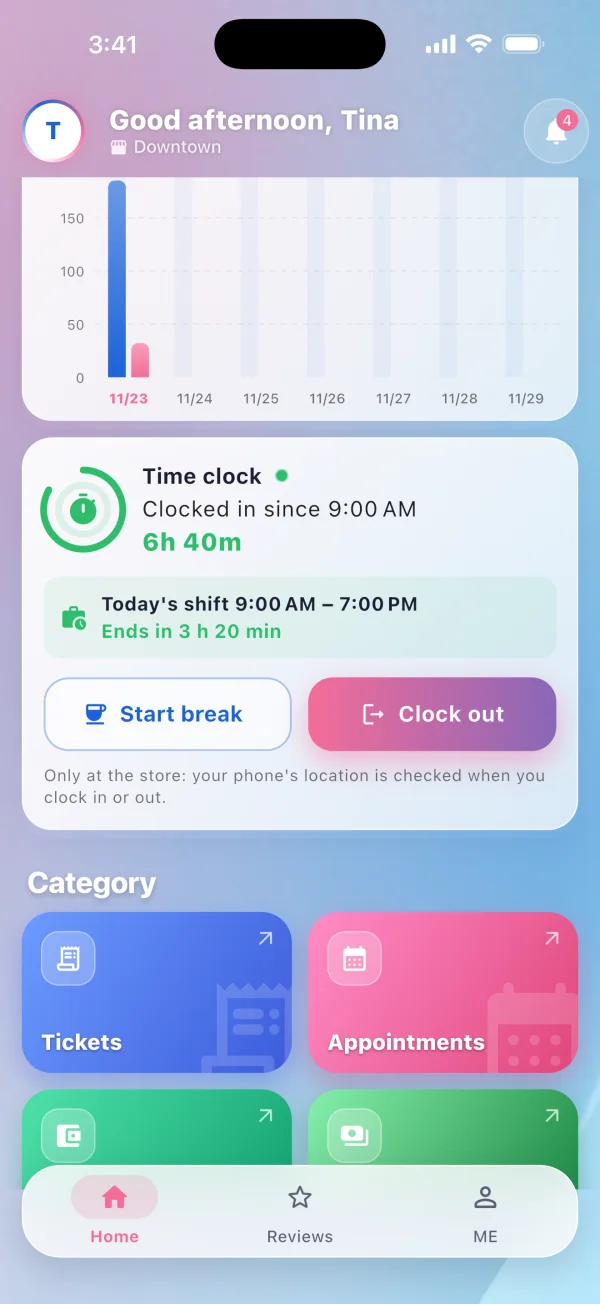
EraPOS Hub 1.3.1 shows each person today's shift under the time clock on Home, and reminds them by notification. It needs WBAMS POS 1.13.10 and a shift for that day: the person's working hours at the location. Nobody is reminded on a day off, or on a day of approved time off.
The reminders
| When | Who is told | What it says |
|---|---|---|
| 5 minutes after the shift started, still not clocked in | The person | You're not clocked in. Your shift started at 9:00 AM. Clock in when you get there. |
| 15 minutes after the shift started, still not clocked in | The location's owners who keep the alert on | Tina hasn't clocked in. Their shift started at 9:00 AM. |
| When the shift ends, still clocked in, and again 30 minutes later | The person | Time to clock out. Your shift ended at 7:00 PM. Clock out before you leave. |
Each reminder is sent once. A person turns their own reminders off with Shift reminders on the ME tab. An owner chooses whether they hear about it with Staff not clocked in or running late, under Alerts on their Home.
Running late
- From an hour before their shift until it ends, a person who is not clocked in sees Running late? under the time clock.
- They press it and choose how late they will be: 5, 10, 15, 20, 30, 45 or 60 minutes.
- The owners are told, such as “Tina is running late. About 10 minutes late.”, and the app answers “The owner knows you're on your way.”
That day, neither reminder about being late is sent, to them or to the owners. See EraPOS Hub for the app itself.