

Booking protection asks clients who book online for a card. Nothing is charged when they book. When someone misses a visit or cancels late, the visit waits for your decision: charge the fee to their card, or let it go. It needs Stripe, which keeps the cards.
Set it up for a location
- Open System Settings → Booking protection.
- On the card Protection at your location, switch on A card is needed to book online. Clients add a card once, to their account. Clients who have one just confirm.
- Under The fee, choose A percentage of the visit or A fixed amount, and type the Fee: 50 for 50%, or 25.00 for $25.00.
- Under A cancellation is late when it comes, choose 2, 4, 12, 24 or 48 hours before the visit, or Only missed visits.
- Under What clients read, type the words clients see at Confirm, or leave it empty for the standard words in their language.
- Press Save.
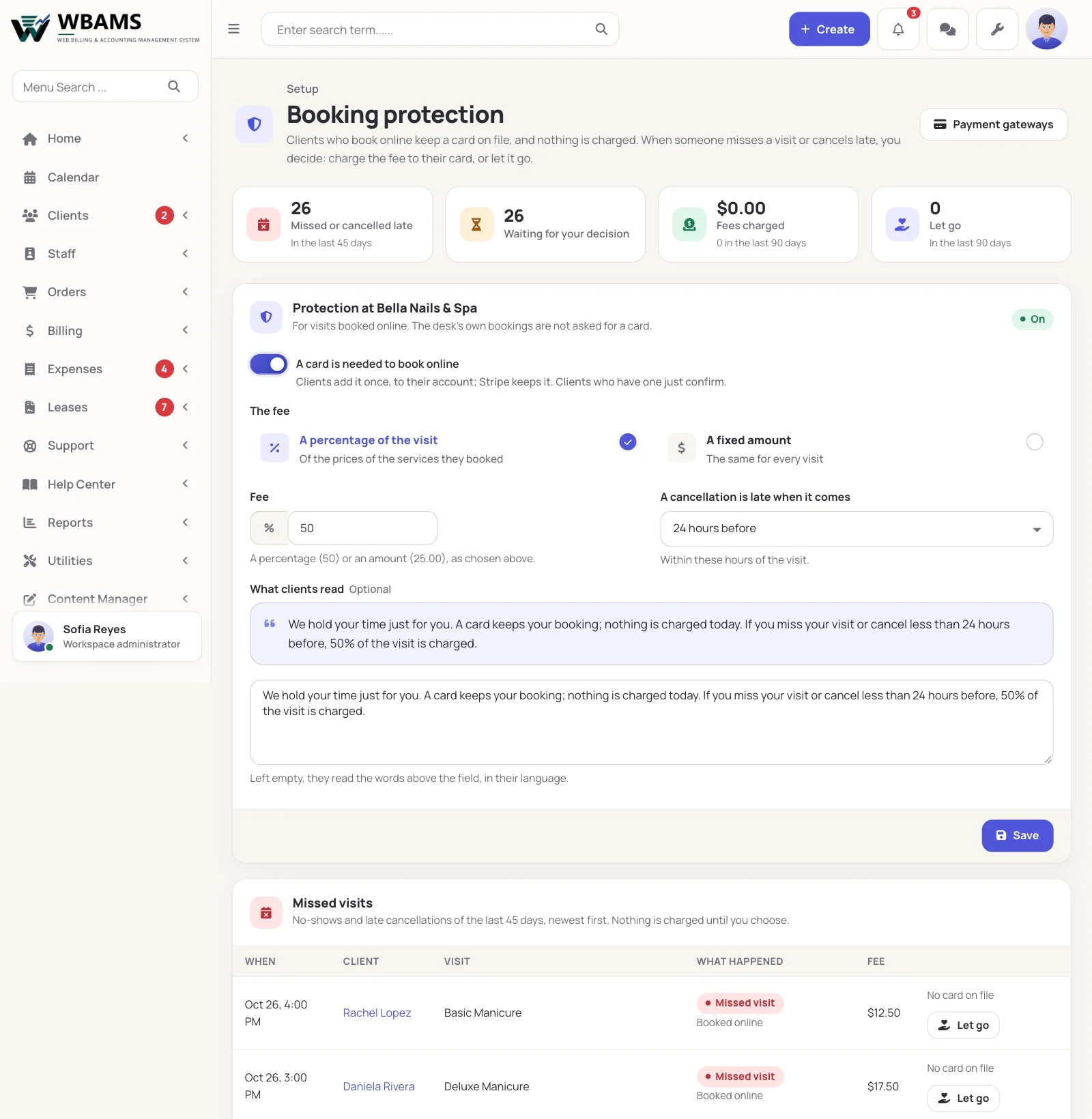
Only visits booked online are asked for a card. Bookings the desk makes are not.
Missed and late-cancelled visits
Missed visits lists the no-shows and late cancellations of the last 45 days, newest first, each with its fee. Nothing is charged until you choose:
- Charge, with the fee beside it, charges the fee to the client's card on file after you confirm.
- Let go leaves it, and the visit is counted under Let go.
A visit whose client has no card on file says so, and can only be let go.