
Return visits sends three messages by themselves, by email and by text. Each goes only to clients with nothing booked, and each client hears once for each visit, and once a year on their birthday.
- Time to book again
- A friendly nudge when it is time for the next visit, 2 to 12 weeks after their last one.
- We miss you
- For clients who have been away a while, 45 to 180 days, with the points they still have.
- Happy birthday
- A greeting to clients with a visit in the last year whose birthday the desk keeps, with gift points if you like.
Switch them on
- Open System Settings → Return visits.
- Under How they go, choose By email, By text, or both.
- For each of the three, switch on Send “Time to book again”, Send “We miss you” or Send “Happy birthday”, and choose Send it: how long after the last visit, or when around the birthday.
- For Happy birthday, type a Gift in points if you like. 0 means no gift.
- Press Save.
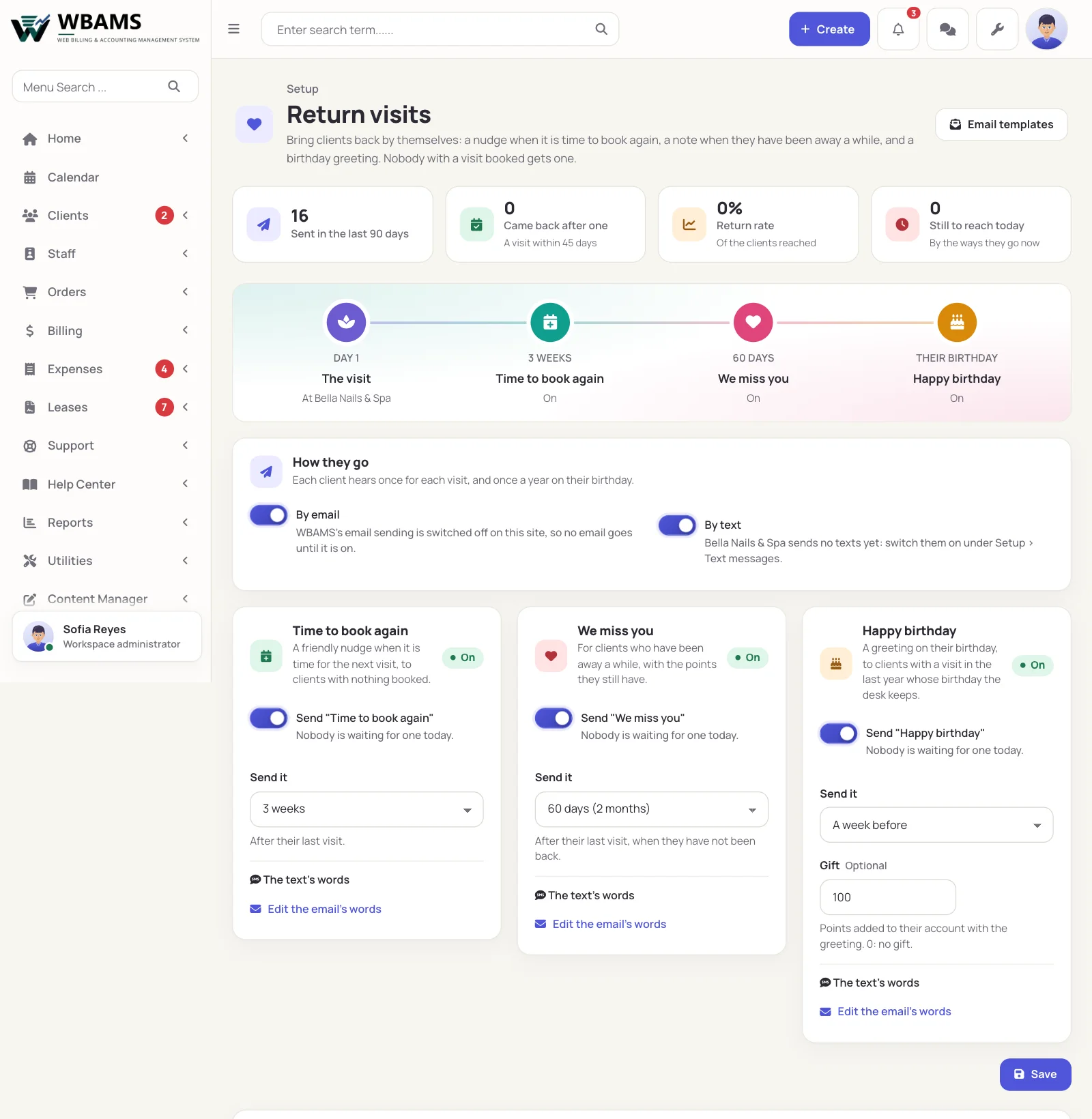
Under each card, The text's words and Edit the email's words change what clients read. Latest messages, at the bottom of the page, lists what went to whom and how, and whether they came back. The figures at the top count the clients who came back within 45 days.